

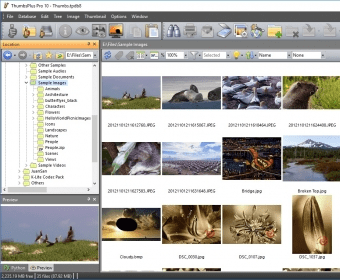
ThumbsPlus 8.0 Beta 6 is a program that will let you manage your images. It will create thumbnails of the images stored in your drives, allowing you to catalog and edit your images easily. The program´s interface will show you the tree of folders on the left. Clicking on any folder will cause the program to show its contents on the central panel. You will see a thumbnail for every image in that folder. Clicking on any thumbnail, the program will show you on the right panel some information about the selected image, such as its name, size, dimensions, file date and date when the image was taken. You will also see the metadata that the image stores in it. Right-clicking on the selected image you will be able to access a lot of features that will let you modify the image in every aspect. You can also create galleries by choosing images, delete, rename, or move images, send them by email or print them. ThumbsPlus runs on Windows 2000, XP, 2003, 2008, Vista and Windows 7. It can be installed and run in twelve languages. ThumbsPlus Beta 6 was originally intended to expire on September 30th, 2009. You can extend the beta period by applying the patch provided by the author at http://www.cerious.com/binaries/cerious/Patchbeta6.exe.


ThumbsPlus Digicam Raw Plug-in support many additional manufacturers and models.














Comments (19)
So sorry for the family of the developer...he sure made life easier for many people.